
How Can We Help?
Product Overview
Introduction
DataMesh Inspector is a runtime digital twin visualization and operations application developed by DataMesh for building, industrial park, and industrial facility operations and maintenance.
Using digital twin data and 3D scenes from the FactVerse platform, the system provides a unified interface for different operational roles. Users can monitor system status, review alerts, and perform on-site tasks.
Typical application scenarios
DataMesh Inspector serves different operational roles across their respective work scenarios:
Operations director / Management decision-makers
- View the overall operational status
- Monitor key performance indicators and anomaly distribution
- Support management decisions and reporting presentations
Operations manager
- Conduct scene-level operational monitoring and alert assessment
- Analyze the impact scope of anomalies
- Coordinate frontline personnel to perform issue handling
Frontline operations personnel
- View alert information on-site
- Locate relevant device
- Perform inspection and handling operations
System components
DataMesh Inspector consists of Command Center and the mobile app. Command Center supports both the desktop client and the WebGL version. Different app endpoints are designed for different usage scenarios and user roles.
- DataMesh Inspector Command Center
Designed for management and dispatch scenarios, Command Center supports both the desktop client and the WebGL version. Users can access Command Center through the desktop client or a browser to browse 3D scenes, view operating status, manage alerts, and manage assets.
- DataMesh Inspector (Mobile Application)
Used for on-site alert viewing and handling, device location and MR scene overlay, as well as on-site execution of work order tasks.
Both client applications operate on the same data foundation to ensure consistency in scene structure, device information, and alert status.
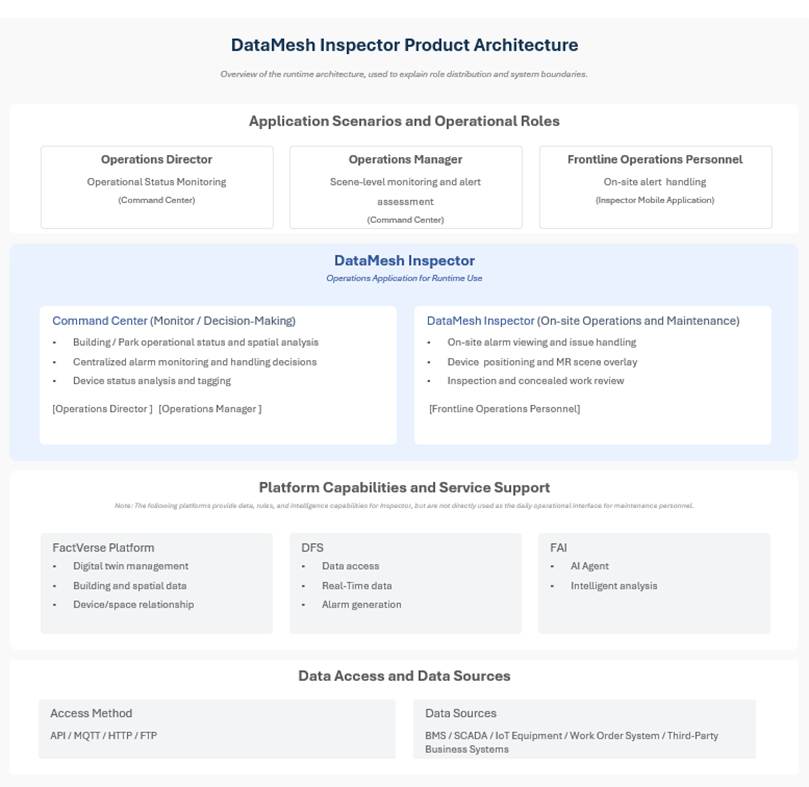
This diagram illustrates the overall architecture of DataMesh Inspector, including the applications used by different operations roles and their relationship with the underlying platform and data systems.
Naming conventions
- DataMesh Inspector: Refers to the overall product name, representing the digital twin operations application system built on the FactVerse platform.
- Command Center desktop client: The Command Center application that must be installed on a PC.
- Command Center WebGL version: The Command Center version accessed through a browser.
When the access method does not need to be distinguished, this document uses “Command Center” to refer to both the desktop client and the WebGL version. - DataMesh Inspector (Mobile Application): Refers to the on-site operations application used on iPhone / devices.
For simplicity, this document may use “Command Center” or “Inspector” as abbreviated names where no ambiguity exists.
Terms and concepts
Large-scale scene / BIM scene
A digital twin environment organized under a unified coordinate system at the industrial park or building level. It is used to centrally manage digital twin assets and their operational data within the space, and supports overall browsing, analysis, and hierarchical device location.
Digital Twin (Device / Space)
A digital representation of a real-world device or spatial object within the system.
- Device Digital Twin: Describes the attributes, status, and relationships of a specific device.
- Spatial Digital Twin: Describes spatial hierarchy structures such as industrial parks, buildings, and floors.
3D Scene
A three-dimensional scene displayed in Command Center, primarily used for monitoring, analysis, and management purposes.
MR Scene Overlay
A viewing method that overlays a 3D model onto the real-world environment,
enabling on-site device location and inspection.
Alert
An abnormal notification generated based on device operational data or business rules.
Data Dashboard
A data view that displays operational metrics, energy consumption, or alert trends in charts.