
How Can We Help?
Single Sign-On (SSO) API Integration for FactVerse and Third-Party Platforms
API Overview
Purpose
This API enables Single Sign-On (SSO) integration between third-party platforms and DataMesh FactVerse.
After a user is authenticated on the third-party platform, the platform may use this API to obtain an access token for FactVerse, thereby achieving seamless cross-system authentication without requiring the user to log in again.
Applicable Scenarios
This API applies to scenarios where a third-party platform needs to share user identity with FactVerse, allowing users to access FactVerse based on their existing authenticated identity without re-logging in.
Prerequisites
- The third-party platform must support the OAuth 2.0 protocol.
- The third-party platform must be registered with FactVerse and have obtained a valid source identifier (from parameter).
- The caller must understand the request parameter format, response structure, and error-handling rules for this API.
API Details
Basic Information
Item | Description |
API Name | Third-Party Single Sign-On Callback API |
HTTP Method | GET |
Endpoint | /api/v6/oauth2/{type}/callback |
Supported Format | JSON |
Response Type | JSON |
Request Parameters
Path Parameters
Parameter | Type | Required | Description |
type | String | Yes | Login type. Must be pre-registered with DataMesh. |
Query Parameters
Parameter | Type | Required | Description | Example |
from | String | Yes | Source identifier used to distinguish third-party platforms (must be pre-registered). | — |
access_token | String | Yes | Access token assigned by the third-party platform. | — |
Request Examples
cURL
Curl -X GET “https://{domain}/api/v6/oauth2/{type}/callback?from={from}&access_token={access_token}”
Request URL
https://{domain}/api/v6/oauth2/{type}/callback?from={from}&access_token={access_token}”
Response Description
Response Format
The API returns data in JSON format, including a status code, message, and business data (returned on success).
Success Response
HTTP Status Code: 200 OK
Example:
json
{
“code”: 0,
“message”: “成功”,
“data”: {
“accessToken”: “eyJhbGciOiJIUzI1NiIsInR5cCI6IkpXVCJ9…”,
“refreshToken”: “eyJhbGciOiJIUzI1NiIsInR5cCI6IkpXVCJ9…”
}
}
Success Response Fields
Field | Type | Description | Example |
code | Integer | Status code, 0 indicates success | 0 |
message | String | Response message | Success |
data | Object | Returned only when the request succeeds | — |
data.accessToken | String | FactVerse access token. Required for subsequent API requests. | eyJhbGciOiJIUzI1NiIsInR5cCI6IkpXVCJ9… |
data.refreshToken | String | Token refresh credential, used to obtain a new access token after expiration. | eyJhbGciOiJIUzI1NiIsInR5cCI6IkpXVCJ9… |
Error Response
HTTP Status Code: non-200 (e.g., 400 Bad Request, 500 Internal Server Error)
Example:
json
{
“code”: “10400001”,
“message”: “参数错误”,
“description”: “请求参数不完整或格式错误”
}
Error Code Description
Error Code | Message | Description | Trigger Condition | Resolution |
10400001 | Parameter error | Required parameters are missing or incorrectly formatted | Missing or invalid from or access_token | Verify and supply all required parameters in the correct format |
10500012 | Third-party authentication failed | Authentication failed on the third-party platform | access_token expired/invalid or authentication exception occurred | Obtain a valid access_token from the third-party platform and retry |
10500013 | User not found | User does not exist in the FactVerse system | Third-party user cannot be matched with a FactVerse user | Ensure the user is registered in FactVerse or contact the DataMesh administrator |
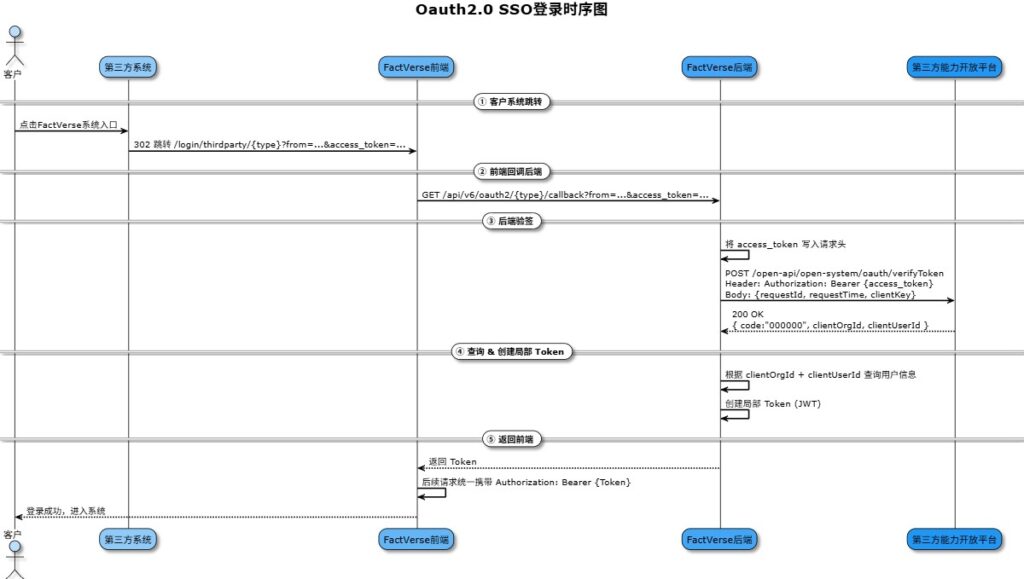
API Call Flow
Flowchart
Key Notes
- Ensure all parameters are included during redirection to prevent missing from or access_token.
- The access_token must be used within its validity period; expired tokens must be refreshed via third-party platforms.
- All subsequent API requests to FactVerse must include:
Authorization: Bearer {accessToken}
Otherwise, access will be denied.
Important Notes
- Ensure network stability to prevent failures caused by timeouts or disconnections.
- accessToken and refreshToken contain sensitive information and must be transmitted over HTTPS and stored securely (encrypted).
- refreshToken has its own validity period. It is recommended to refresh the access token within 30 minutes before expiration (requires integration with the token refresh API).
- If authentication fails 5 or more times within 1 hour, the third-party platform’s access may be temporarily frozen; contact the administrator to lift the restriction.
Contact Information
If you encounter issues during integration, please contact:
Technical Support Email: support@datamesh.com