Understand Model Use and Runtime Evidence
The model registry tells you what has been registered. The Model Usage Detail page tells you where a version is bound and whether persisted runtime evidence shows that it actually ran.
Use this page before stating that a model is protecting an equipment record, before promoting another candidate, and when investigating why a model produced no customer-visible Finding.
Prerequisites
| Requirement | Why it matters |
|---|---|
| Correct tenant and equipment | Registry and assignment evidence is tenant-scoped and must describe the intended equipment. |
mlops.model.read or system.config | One of these permissions is required to open the registry and usage detail. |
| Exact registry version | A model-type name can refer to several equipment-specific artifacts. |
| Registered assignment and artifact metadata | Without binding and immutable artifact identity, the page cannot establish which executable version was selected. |
| Recent evaluation window | Current-use conclusions require evidence recent enough for the operating decision. |
Open the Exact Model Version
- Open the model registry at
/ai-model-registry. - Select the intended registry record.
- Confirm the model type, artifact kind, version, training time, and bound target.
- Open the Model Usage Detail route
/ai-models/registry/:registryId. - Confirm that the displayed equipment belongs to the current tenant and expected site.
Use the numeric registry identity selected by the application. A model-type name can have several equipment-specific versions and is not sufficient to identify one artifact.
Viewing the registry and usage detail requires mlops.model.read or system.config. The page is read-only.
Read the Page from Top to Bottom
| Section | What to verify |
|---|---|
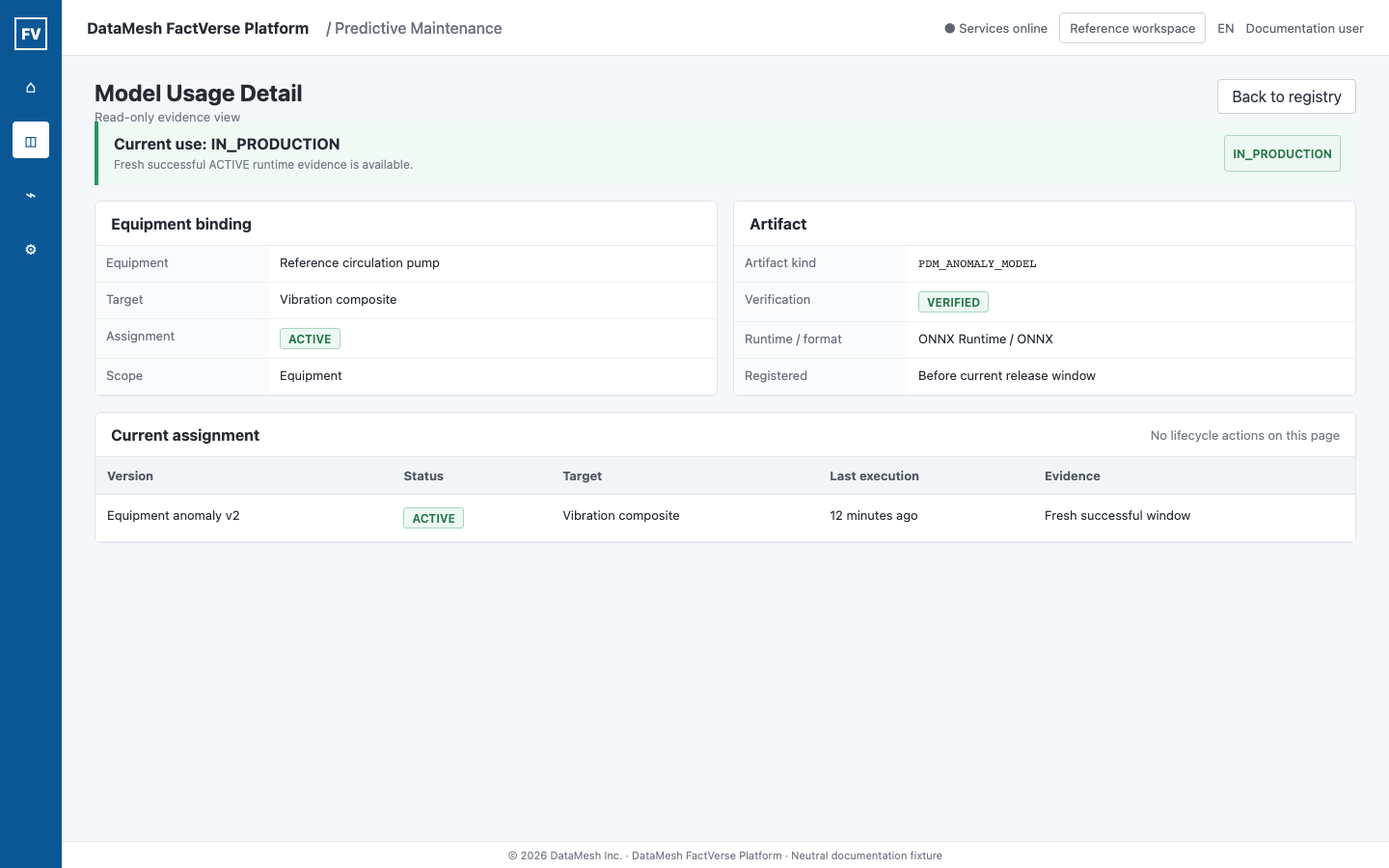
| Current use | Runtime status, reason, target, assignment state, and last execution time. |
| Equipment binding | Equipment identity, target, scope, and every assignment related to this version. |
| Runtime evidence | Execution mode, hourly evidence window, evaluation and success times, result counts, and SHADOW disagreement. |
| Training evidence | Algorithm, sample count, training window, artifact kind, and training time. |
| Artifact | Verification state, runtime, format, digest summary, and registration time. |
| Related versions | Other versions in the same governed model family. |
| Lifecycle events | Training, verification, promotion, rollback, actor, and event time. |
The page intentionally does not expose an artifact storage path or credentials.
Runtime Usage Status
| Status | Meaning | What to do |
|---|---|---|
IN_PRODUCTION | An ACTIVE assignment has fresh successful persisted runtime evidence. | Review the execution time and any customer-visible Finding provenance. |
ACTIVE_AWAITING_EVIDENCE | The assignment is ACTIVE, but no sufficiently fresh successful execution is available. | Check source freshness, operating state, scheduler/executor health, and artifact loading. Do not claim live use yet. |
STALE | The version ran previously, but its latest evidence is too old for the current decision. | Restore data or execution and wait for a fresh successful window. |
SHADOW_ONLY | The version runs only for comparison. | Review disagreement without treating it as customer-visible production output. |
NOT_IN_USE | No live assignment currently selects this version. | Inspect related versions and the equipment's active assignment. |
FALLBACK | The model path was not used and the evaluation fell back to a declared safe criterion. | Read the reason and repair the data, artifact, or runtime dependency. |
CONFLICT | More than one live assignment or another selection conflict prevents a trustworthy choice. | Stop lifecycle actions and have an administrator resolve the conflict. |
ARTIFACT_UNAVAILABLE | The assigned artifact is missing, rejected, or not verified for execution. | Repair artifact registration or verification before production use. |
ACTIVE is an assignment state. IN_PRODUCTION is a runtime-use conclusion supported by fresh evidence. They are not interchangeable.
Runtime Evidence Windows
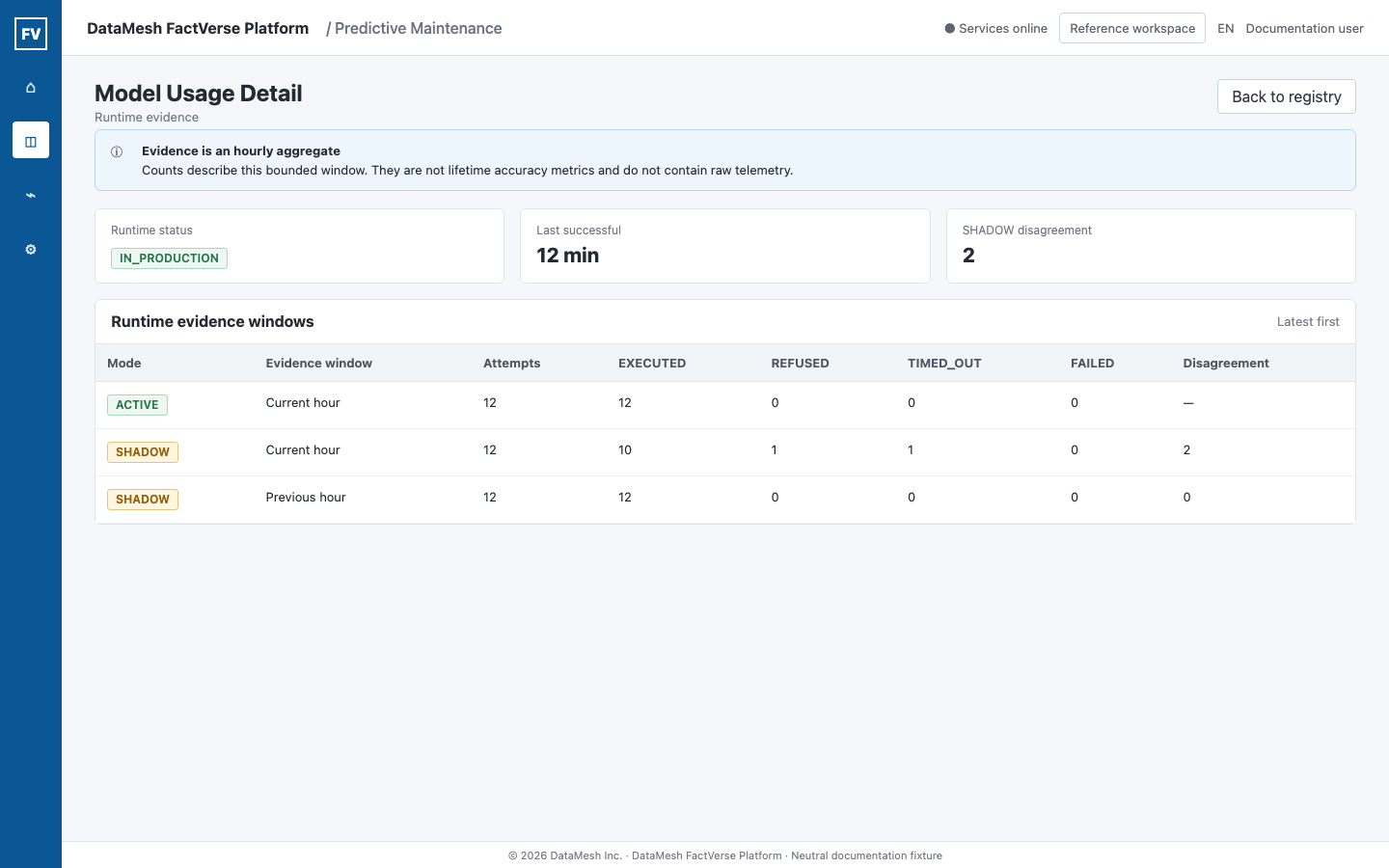
Runtime evidence is stored as bounded aggregation, not as a copy of every telemetry sample.
| Field | Interpretation |
|---|---|
| Execution mode | ACTIVE, SHADOW, or another explicit mode used for the evaluation. |
| Evidence window | The hour represented by the aggregate. It is not the complete model lifetime. |
| Last evaluated | The latest evaluation observed in the window. |
| Last successful | The latest successful model execution in the window. |
| Attempts | All recorded attempts in the window. |
| Executed | Successful executions. |
| Refused | Evaluations rejected because required inputs or preconditions were not met. |
| Timed out | Executions that exceeded the runtime limit. |
| Failed | Executions that ended with an error. |
| Disagreement | SHADOW comparisons whose result differed from the active path. |
The main evidence result states are:
EXECUTED: the model runtime completed;REFUSED: the runtime deliberately did not execute with the provided conditions;TIMED_OUT: execution did not complete within the allowed time;FAILED: execution ended in an error.
A disagreement count is not accuracy, precision, recall, or proof that one model is better. It only shows that the compared paths differed.
Verify the Artifact
| Artifact state | Meaning |
|---|---|
| Verified metadata | The registered identity, digest, size, runtime, and format passed metadata verification. |
| Pending verification | Verification has not completed. Do not promote for production execution. |
| Rejected | The artifact failed verification. |
| Not registered | No immutable artifact is available for this registry version. |
The digest identifies immutable bytes. It does not tell a user whether the model is accurate or suitable for a particular equipment record.
The artifact kind also matters:
PDM_BASELINE_DISTRIBUTIONdescribes statistical equipment behavior;PDM_ANOMALY_MODELidentifies an executable anomaly-scoring artifact.
Do not use baseline metrics as evidence that an executable anomaly model ran.
Read Training Evidence Carefully
Review the training window, sample count, algorithm, artifact kind, and any published metrics together.
The page intentionally hides metrics whose labels imply accuracy, precision, recall, F1, or AUC when no governed ground-truth contract supports them. A model can be trained and executable without having validated customer outcome accuracy.
Check that the training window:
- belongs to the intended equipment;
- includes enough valid running periods;
- excludes known maintenance or commissioning periods where required;
- uses the expected target and units;
- has a clear data cutoff.
Separate AutoML comparison evidence from runtime evidence
The Model Console compares a candidate with the current production criteria over a frozen historical evaluation window. This is training decision evidence, not proof that the candidate has run in production.
| Evidence | What it can support | What it cannot support |
|---|---|---|
| Same-basis champion and candidate metrics | Whether the candidate passed the declared coverage, alert-burden, and stability gates on the same frozen window. | Live execution, customer outcome accuracy, or future performance. |
NO_FEASIBLE | No candidate passed every required gate. | The equipment is healthy or the current criteria are optimal. |
NO_MATERIAL_GAIN | A feasible candidate did not improve enough over the current criteria to justify a change. | The candidate ran as SHADOW or ACTIVE. |
| Candidate selected | The candidate may proceed to governed registration and validation. | Automatic production activation or a maintenance recommendation. |
After registration, use persisted SHADOW or ACTIVE runtime evidence on this page to determine whether the exact version actually executed. See Train and Manage an Equipment Model for the complete decision flow.
Relate Execution to Findings
Model execution and Finding creation are separate facts.
| Observation | Correct conclusion |
|---|---|
Fresh ACTIVE evidence and a new Finding | The model ran, and the governed Finding conditions produced a customer-visible record. |
Fresh ACTIVE evidence and no new Finding | The model ran, but the combined evidence, persistence, hysteresis, cooldown, or enabled scope did not create a new Finding. |
| No fresh runtime evidence and no Finding | Model execution is not confirmed. Check runtime and data readiness first. |
| SHADOW evidence and no Finding | Expected. SHADOW cannot create customer-visible results. |
Data state is NOT_RUNNING, COVERAGE_GAP, or STALE | The evidence is not currently evaluable. Do not interpret it as healthy. |
Use Review Findings and Record Feedback to interpret a Finding's standard, baseline, model, and data-quality evidence.
Use Lifecycle Events for Audit
Lifecycle events answer:
- when training completed;
- when artifact verification changed;
- who promoted or rolled back an assignment;
- which assignment the event affected;
- when the event occurred.
Events preserve history. A rollback does not delete the previous assignment, runtime evidence, Finding, or feedback event.
Troubleshooting
| Symptom | Check |
|---|---|
The page says NOT_IN_USE | Related versions and the equipment's current live assignment. |
The page says ACTIVE_AWAITING_EVIDENCE | Source freshness, equipment running state, runtime scheduler, artifact verification, and the next evaluation window. |
| Evidence is stale | Last data time, expected source cadence, and executor health. |
| The artifact is unavailable | Verification state, digest/size metadata, runtime format, and deployment packaging. |
| SHADOW has disagreements | Compare the exact windows and operating context; do not infer accuracy without reviewed outcomes. |
The model is IN_PRODUCTION but there is no Finding | Finding persistence, data quality, fusion conditions, cooldown, and enabled equipment scope. |
| An expected version is missing | Tenant context, exact registry identity, equipment binding, and retired versions. |
| Promotion or rollback controls are missing | The standard usage detail is read-only; assignment lifecycle changes are administrator API workflows. |
Validation Checklist
- The exact registry version is open.
- Equipment and target binding are correct.
- Artifact kind and verification state are understood.
- Runtime status is based on persisted evidence, not registry status alone.
- The evidence window and last success time are recent enough for the decision.
- SHADOW disagreement is not presented as accuracy.
- No-data states are not presented as healthy.
- Finding presence or absence is interpreted separately from model execution.