Train and Manage an Equipment Model
Equipment models move through a controlled lifecycle. Training creates a candidate for review. It does not automatically replace the criteria that currently protect an equipment record.
This guide explains the two model tracks used by Predictive Maintenance, what users can do in the application, and which lifecycle actions currently require an administrator API.
Know Which Model You Are Managing
Predictive Maintenance keeps these artifacts separate:
| Model track | Purpose | Current training entry | Production authority |
|---|---|---|---|
Equipment baseline distribution (PDM_BASELINE_DISTRIBUTION) | Describes the equipment's observed operating distribution for baseline comparison. | Predictive Maintenance > Model Console | The baseline promotion gate in the Model Console |
Executable anomaly model (PDM_ANOMALY_MODEL) | Runs an anomaly-scoring artifact for a specific equipment target. | Model Console > Optimize detection, Equipment Detail, or administrator API | An ACTIVE assignment that references a verified immutable artifact |
Do not treat a baseline distribution as an executable anomaly model. A successful baseline calculation does not prove that an anomaly artifact ran, and an anomaly score is not a failure probability.
Access and Permissions
| Task | Entry | Required permission |
|---|---|---|
| View the Model Console | /pdm/model-console | mlops.model.read or system.config |
| View model use details | /ai-models/registry/:registryId | mlops.model.read or system.config |
| Train or promote a baseline | Model Console | pdm:write |
| Start or cancel an anomaly optimization | Model Console, Equipment Detail, or Platform AutoML API | mlops.model.write, pdm:write, or system.config |
| View optimization progress and outcome | Optimization drawer or Platform AutoML API | mlops.model.read, pdm:read, or system.config |
| Directly train one executable anomaly candidate | Administrator API | pdm:write |
| Promote or roll back an executable assignment | Administrator API | pdm:write |
| Review equipment findings | /pdm/anomalies and Finding Detail | pdm:read |
The standard Model Usage Detail page is read-only. It shows assignment and runtime evidence, but it does not currently provide assignment promotion or rollback buttons.
Lifecycle at a Glance
SHADOW means the candidate can run for comparison without changing alerts, health scores, advisories, or findings. ACTIVE gives an assignment production authority, but production use is not confirmed until fresh successful runtime evidence appears.
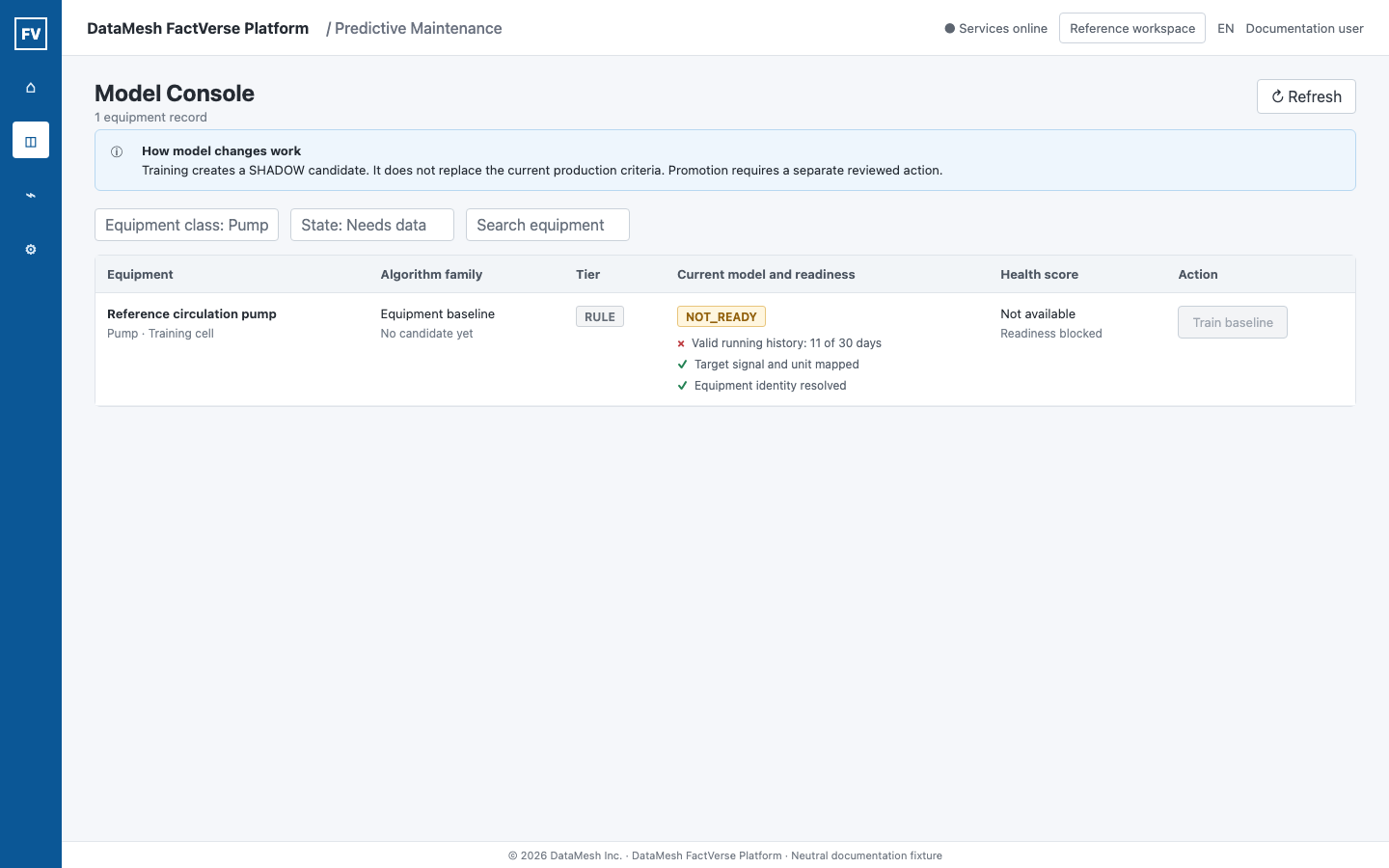
Train a Statistical Equipment Baseline
- Open Predictive Maintenance > Model Console.
- Find the equipment record.
- Review the readiness result and every unmet criterion.
- Confirm that the equipment identity, target signal, unit, operating-state history, and training window are correct.
- Select the training action when the record is eligible and your role has
pdm:write. - Wait for the console to refresh and confirm the new version and training time.
Readiness can have different meanings:
| Result | Meaning | Next action |
|---|---|---|
| Eligible | The required data conditions are currently met. | Train, then review the resulting SHADOW candidate. |
| Missing criteria | One or more measurable requirements are not met. | Collect the missing running history or repair the required signal. |
| Cannot determine | The service cannot make a readiness decision. | Resolve the stated identity, data, or service problem. Do not report it as insufficient history. |
| Caveat | Training can proceed, but the window has a known limitation. | Record the caveat and include it in the release review. |
Training the baseline creates a candidate for comparison. The existing production criteria remain in effect.
Optimize Anomaly Detection
The optimization workflow compares bounded, explainable candidate methods against the decision path that was active when the job started. It can be opened from either location:
- Predictive Maintenance > Model Console > Optimize detection on the equipment row;
- Equipment Detail > Optimize detection.
The drawer first freezes the exact equipment, measurement and unit, recommended training window, Data as of, and current decision basis. Review these fields before starting a job. They are part of the evidence, not display-only context.
Resolve readiness before searching
Every readiness criterion shows actual and required values. A blocked job is not a failed model and should not be reported as one.
| Blocker | Action |
|---|---|
| No active vibration source or multiple matching bindings | Correct the equipment-to-source binding in Data Integration. |
| Measurement unit is missing | Add the unit to the source binding. Do not infer or convert it in the optimization drawer. |
| ISO comparison band cannot be determined | Select Complete equipment profile, then add rated power and bearing/support type before returning to the job. |
| Running samples, weeks, span, or continuity are insufficient | Keep collecting valid running-state history or repair the source. Do not substitute stopped periods. |
| Time-series evidence is unavailable | Restore the governed data service, then refresh readiness. |
| No runner is available or the tenant queue is full | Wait for capacity or ask the administrator to inspect the private/staging runner pool. Repeated clicks do not create useful evidence. |
Choose a bounded search budget
| Budget | Use it for |
|---|---|
Quick (QUICK) | A bounded first pass for routine equipment review. |
Standard (STANDARD) | A broader candidate comparison for engineering review. |
Deep (DEEP) | An approved specialist investigation with more time and compute capacity. |
The available budgets come from tenant policy and runner capacity. A missing budget is not a browser problem. Selecting a larger budget does not guarantee a winner or a more accurate result.
Select Start optimization once the target and readiness evidence are correct. The task remains durable if the drawer is closed. Reopen the same equipment to restore the latest task, or use Cancel task to request cancellation. Cancellation preserves completed evidence.
Understand what the job produced
The progress stages prepare the governed snapshot, compare candidate methods, validate time windows, verify the artifact, and register a SHADOW candidate when one qualifies. The current bounded search can compare Isolation Forest and statistical baseline candidates; it does not search arbitrary user code.
The terminal result is one of these outcomes:
| Outcome | Meaning | Next action |
|---|---|---|
NO_WINNER / Keep the current decision path | No candidate passed the governed feasibility and material-improvement gates. No SHADOW model was created. | Keep the current path, correct data limitations if relevant, and only rerun when evidence or the approved budget changes. |
| Shadow candidate ready | One candidate passed the gates and was registered as an immutable SHADOW assignment. | Open model evidence and review it. The candidate still cannot change customer alerts, health scores, advisories, or Findings. |
| Failed or timed out | The page shows a safe reason such as unavailable runner, dependency failure, timeout, or invalid artifact. | Resolve that reason; do not present a partial trial as a model result. |
Read the result in four layers
Read the completed drawer from top to bottom:
- Conclusion states whether the current production criteria remain unchanged or a SHADOW candidate was created.
- Impact states what can change now. A SHADOW result cannot change customer alerts, health scores, advisories, or Findings.
- Evidence shows the frozen current production criteria, evaluated methods, per-gate results, the evidence window, sample count, and data cutoff.
- Action tells the operator to keep the current path, correct a data gap, rerun under a justified budget, or review the registered SHADOW model.
The comparison table can include a Current production criteria row. Its values use the same evaluation window, metric semantics, units, and observation counts as the compared candidate. Candidate rows show each governed gate as an actual value and requirement, for example coverage: actual 68%; required at least 70%. A missing value is shown as Not evaluated, never as zero.
| Evidence | Operational interpretation |
|---|---|
| Coverage | Share of the historical running window that had usable evidence. Higher coverage means fewer data gaps. |
| Stability | Consistency of alert burden across historical folds. It does not mean model accuracy. |
| Alert burden | Share of running samples the method would flag for review. It is not alerts per day. |
| Drift | Distribution change between training and validation windows. |
| SHADOW disagreement | Share of samples where the candidate and current criteria differed. It is not an error rate. |
| Compute cost | Processing time per bounded sample volume. It describes resource demand only. |
Interpret the three selection cases carefully:
- No feasible candidate: no candidate passed all gates. The UI shows each candidate's failed gates and does not label one as the best candidate.
- Feasible but no material gain: the UI identifies the candidate that was actually compared with the frozen current criteria. Production remains unchanged.
- Candidate selected: the selected candidate is registered for SHADOW review only. It is not automatically promoted.
Historical jobs created before per-gate evidence was introduced remain readable. They show an aggregate explanation and an explicit legacy-evidence note rather than reconstructing thresholds or guessing a comparison candidate in the browser.
When confirmed fault labels are absent, compare coverage, stability, alert burden, drift, SHADOW disagreement, and compute cost. These values describe behavior and operational burden. They do not establish accuracy, precision, recall, or failure probability. NO_WINNER is a valid and useful result.
API boundary
The UI uses the durable Platform AutoML job contract:
| Method | Endpoint | Purpose |
|---|---|---|
POST | /api/v1/platform/automl/jobs | Create a governed candidate-search job. |
GET | /api/v1/platform/automl/jobs/{jobId} | Read durable progress. |
GET | /api/v1/platform/automl/jobs/{jobId}/outcome | Read trials, selection evidence, and the next action. |
POST | /api/v1/platform/automl/jobs/{jobId}:cancel | Request cancellation without deleting evidence. |
POST /api/v1/pdm/model-console/{equipmentId}/train-anomaly-model remains a direct administrator integration for creating one executable candidate. It is not the multi-candidate optimization workflow.
After a SHADOW candidate is created, open the exact registry record, confirm the equipment and target binding, verify the immutable artifact, and review runtime comparison evidence before any release decision. All UI and API actions must run in the intended tenant; never reuse an assignment, job, or registry identifier copied from another tenant or environment.
Review SHADOW Behavior
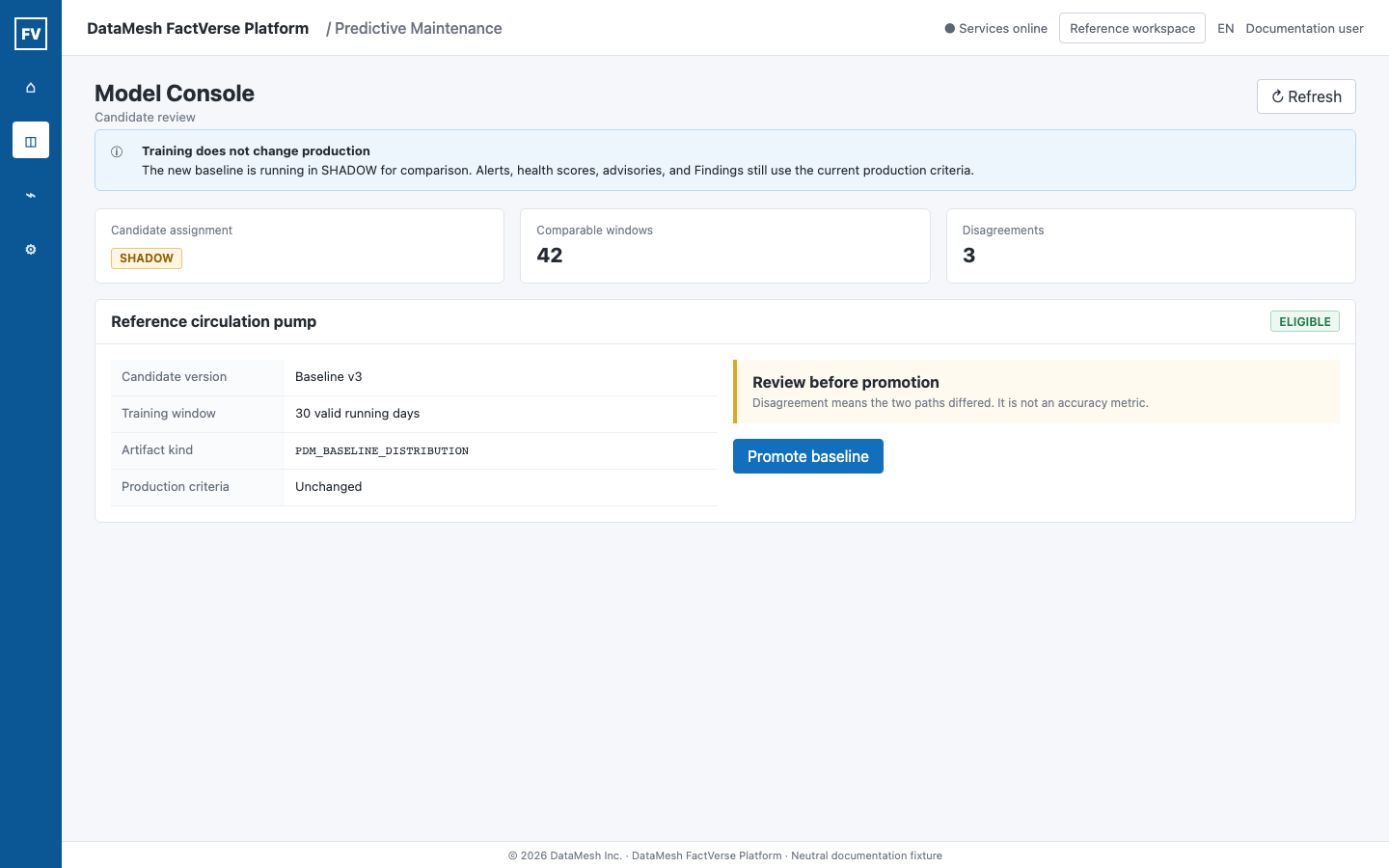
Use the Model Usage Detail page to review the candidate:
- the exact equipment and target binding;
- assignment status;
- artifact kind, runtime, format, and verification status;
- training window and sample count;
- recent SHADOW execution windows;
- executed, refused, timed-out, and failed counts;
- SHADOW disagreement count and reason.
A disagreement means the SHADOW result differed from the current production path in at least one recorded comparison. It does not establish which result was correct. A candidate that produces fewer alerts is not automatically more accurate; it may also miss relevant conditions.
Use field findings, reviewed maintenance outcomes, operating context, and data-quality evidence when deciding whether the candidate is useful.
Promote Deliberately
Baseline promotion in the UI
For an eligible baseline in SHADOW, the Model Console can show the promotion action to a user with pdm:write. The backend release gate checks that the baseline can be compared against the current criteria. It does not claim that the baseline is more accurate.
If promotion is refused, follow the returned reason. Typical actions include repairing the equipment profile, training a candidate first, waiting for valid running samples, or restoring the time-series service.
Executable assignment promotion by API
Executable anomaly-model assignments use the administrator endpoint:
| Method | Endpoint |
|---|---|
POST | /api/v1/pdm/model-console/assignments/{assignmentId}/promote |
Promotion changes lifecycle state atomically. After it succeeds, verify all of the following:
- the intended assignment is
ACTIVE; - the intended registry version is
PRODUCTION; - the previous equipment-level production assignment is retired;
- the artifact remains verified;
- fresh
ACTIVEruntime evidence appears; - customer-visible findings, if any, refer to the expected model provenance.
Do not describe the model as running in production when the page reports ACTIVE_AWAITING_EVIDENCE, STALE, FALLBACK, CONFLICT, or ARTIFACT_UNAVAILABLE.
Roll Back an Executable Assignment
Rollback is currently an administrator API workflow:
| Method | Endpoint |
|---|---|
POST | /api/v1/pdm/model-console/assignments/{assignmentId}/rollback |
The assignmentId identifies the assignment whose lifecycle history is being rolled back. Use the identifier returned by the tenant-scoped model APIs. Do not infer it from a URL, model name, or another environment.
After rollback:
- confirm the replacement assignment is
ACTIVE; - confirm the rolled-back assignment and registry have the expected historical state;
- wait for fresh runtime evidence from the restored artifact;
- confirm the previous artifact is no longer referenced by a live assignment;
- review customer-visible findings and alerts for continuity.
Rollback changes the model selection path. It does not delete historical assignments, lifecycle events, runtime evidence, findings, or feedback.
Understand the Main States
| State | What it proves | What it does not prove |
|---|---|---|
STAGING | The registry version is a candidate. | That it can affect customer results. |
SHADOW | The assignment is available for non-writing comparison. | That it is the production model. |
ACTIVE | The assignment has production selection authority. | That a recent execution succeeded. |
PRODUCTION | The registry version is the production version for its governed scope. | That every equipment evaluation used it. |
RETIRED or ROLLED_BACK | The version or assignment is historical. | That its audit evidence was deleted. |
For actual execution status, use the runtime evidence on the Model Usage Detail page.
Troubleshooting
| Symptom | Check |
|---|---|
| Training action is not visible | pdm:write, readiness eligibility, current assignment state, and whether this is an API-only anomaly-model workflow. |
| Training is refused | Equipment identity, target signal, operating-state history, window coverage, and the returned reason. |
| Candidate stays in SHADOW | This is the expected safe state until a human release decision; review comparison evidence and promotion prerequisites. |
| Promotion succeeded but the model is not shown as in production | Wait for fresh runtime evidence and inspect ACTIVE_AWAITING_EVIDENCE, stale data, fallback, or artifact verification. |
| Multiple live assignments are reported | Stop lifecycle changes and ask an administrator to resolve the conflict. |
| Rollback button cannot be found | Assignment rollback is currently an administrator API, not a standard Model Usage Detail action. |
| A model ran but no Finding appeared | Review data quality, persistence, fusion conditions, and Finding enablement; no Finding does not mean no execution. |
Validation Checklist
- The equipment and target are correct.
- The statistical baseline and executable anomaly artifact are not confused.
- Training created a candidate rather than silently changing production.
- SHADOW evidence did not change customer-visible results.
- Promotion was performed by an authorized user after review.
- Fresh
ACTIVEruntime evidence confirms actual use. - Rollback, when used, restored the intended artifact and preserved audit history.