Review Findings and Record Feedback
An equipment Finding is a customer-visible operational record that brings governed evidence into one review workflow. It is not a raw model event, a guaranteed fault diagnosis, or a failure probability.
Use the Finding Detail page to understand what happened, why the condition deserves attention, which evidence supports or limits the conclusion, what to inspect, and how to record human judgement.
Access and Entry Points
| Task | Entry | Permission |
|---|---|---|
| List and open findings | /pdm/anomalies and /pdm/findings/:alertId | pdm:read |
| Open the related equipment | Finding Detail | pdm:read |
| Record the first judgement | Finding Detail | pdm:write |
| Correct a previous judgement | Finding Detail | system.config |
| Open an advisory | /pdm/advisory/inbox | Applicable Predictive Maintenance read/write permission for the action |
Finding lookup is tenant-scoped. A link from another tenant should not reveal whether an identifier exists there.
Review Flow
Start with the evidence time and data quality. A precise-looking score based on stale, missing, suspect, or non-running data is not a valid current conclusion.
What Happened
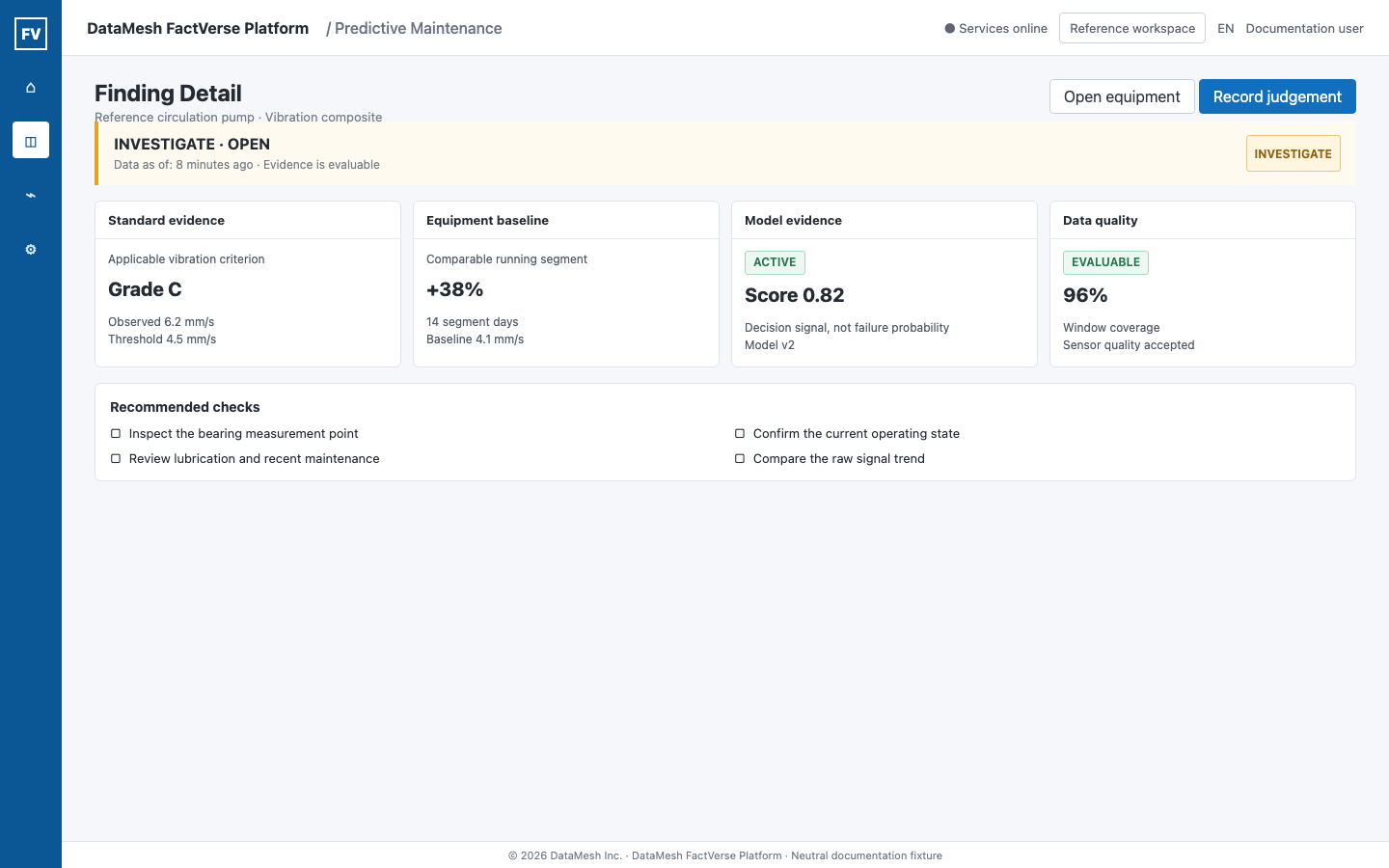
The summary identifies:
- the affected equipment and target;
- attention level and Finding status;
- first and last observation time;
- abnormal and clear persistence windows;
- the data cutoff shown as Data as of.
Attention and lifecycle status answer different questions:
| Field | Values | Meaning |
|---|---|---|
| Attention | OBSERVE, INVESTIGATE, URGENT | How quickly the condition deserves engineering review. |
| Status | OPEN, ACKNOWLEDGED, RESOLVED | Where the Finding is in the operating workflow. |
An urgent Finding still requires evidence review and safe maintenance procedures. The attention label does not authorize an automatic field action.
Review the Four Evidence Layers
1. Standard or rule evidence
This layer shows the applicable criterion, grade, observed value, and threshold. It represents the governed standard or rule result.
The model cannot rewrite or replace a mandatory standard result. If the standard and model disagree, both remain visible.
2. Equipment-baseline evidence
This layer compares the current operating segment with the equipment's own baseline distribution. Review:
- baseline judgement;
- current level and segment baseline;
- drift amount;
- number of segment days;
- operating context used for comparison.
A baseline can abstain when the segment is not comparable or the required history is not available.
3. Model evidence
This layer identifies the execution mode, model version, score, score meaning, and runtime observation time.
The model score is a decision signal, not a failure probability. Do not convert a score such as 0.8 into “80% chance of failure” unless a separately governed probability calibration explicitly supports that interpretation.
SHADOW model evidence is comparison evidence only. It cannot create or alter customer-visible alerts, health scores, advisories, or findings.
4. Data-quality evidence
| State | Meaning | Review response |
|---|---|---|
EVALUABLE | The evidence meets the current evaluation requirements. | Continue with engineering review. |
NOT_RUNNING | The equipment was not operating in the required state. | Do not infer health from the missing operating evidence. |
COVERAGE_GAP | Required data coverage is missing. | Repair or wait for the missing interval. |
SENSOR_SUSPECT | Sensor evidence may be unreliable. | Inspect the sensor, mapping, unit, or mounting point. |
STALE | The latest data is older than the allowed decision window. | Restore collection before using the Finding as current evidence. |
INSUFFICIENT_HISTORY | The baseline or persistence window lacks enough history. | Collect more valid operating history. |
UNKNOWN | The service cannot determine quality. | Treat the result as not evaluable and investigate the source. |
These states are not healthy or zero-risk results.
Perform Recommended Checks
The Finding can include a bounded list of checks such as:
- inspect the bearing and vibration measurement point;
- inspect cooling, lubrication, and the temperature sensor;
- inspect the affected measurement point and operating condition.
Treat them as review steps, not as proof of root cause. Follow the site's safety, permit, isolation, and maintenance procedures before field work.
If no recommended check is stored, use the equipment profile, signal history, applicable SOP, recent work, and maintenance owner to define the next safe review step. An AI assistant must not invent a missing fact, root cause, or action.
Connect the Finding to Action
From Finding Detail, users can:
- open the equipment profile;
- open the related advisory when one exists;
- continue into an inspection or maintenance workflow;
- record human judgement about the Finding.
An advisory and a Finding have different roles. The Finding preserves the evidence and attention state. The advisory records a proposed action and its operating workflow.
Record Human Judgement
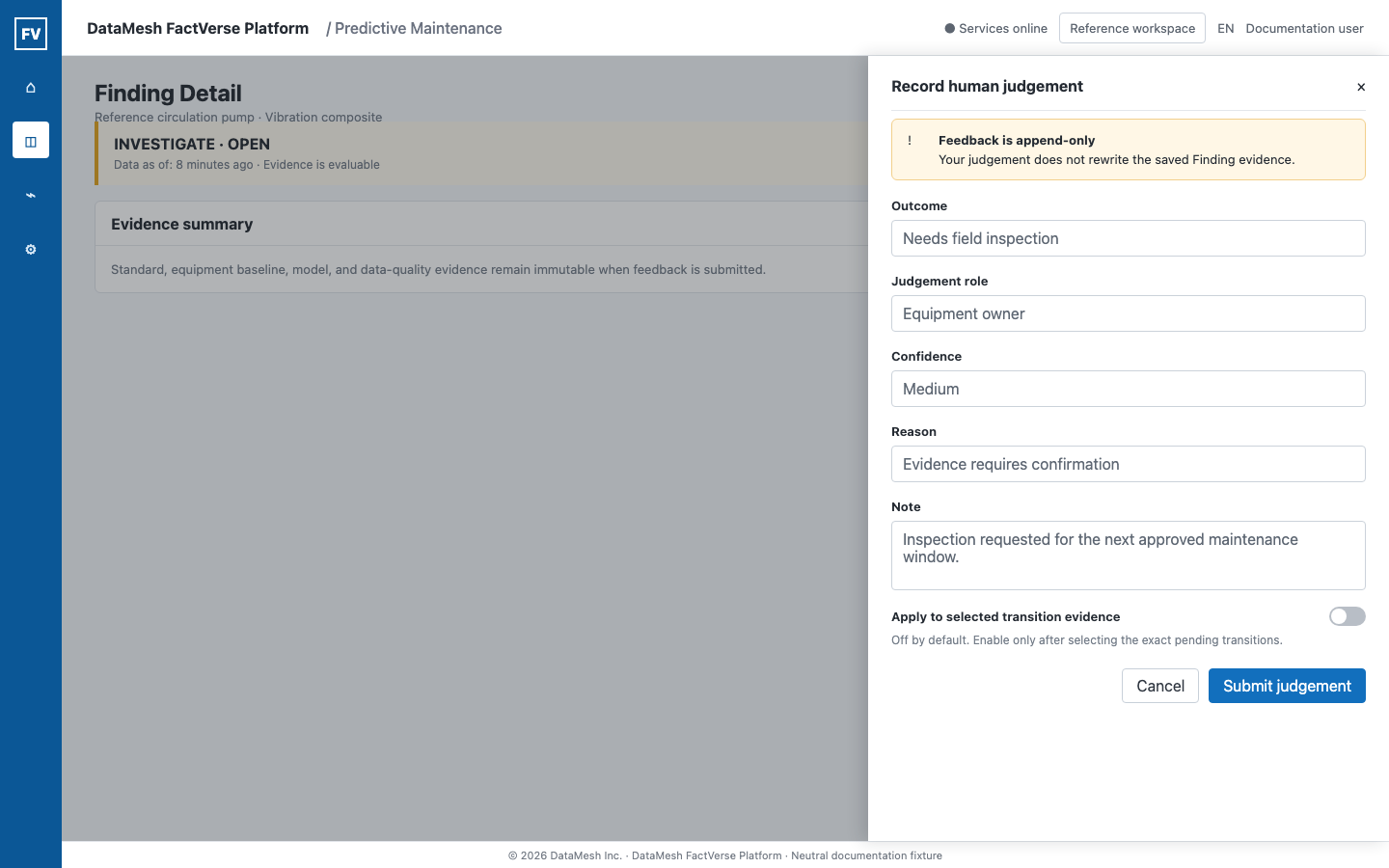
The first feedback event records:
| Field | Purpose |
|---|---|
| Outcome | The reviewed result selected from the governed vocabulary. |
| Judgement role | Whether the judgement is from the equipment owner or service provider perspective. |
| Confidence | The reviewer's confidence in the human judgement. |
| Reason | A structured explanation category. |
| Note | Additional factual context. Do not add unsupported diagnosis. |
Submitting feedback creates an append-only event. It does not rewrite the saved standard, baseline, model, data-quality, or lifecycle evidence.
The request is idempotent. Repeating the same request with the same idempotency key must not create duplicate feedback.
Apply Feedback to Transition Evidence Only When Intended
The option to apply judgement to selected transition evidence is off by default.
Enable it only when the reviewer has deliberately selected the pending equipment transitions that the judgement supports. Unselected transitions remain unchanged. A general Finding judgement must not silently label every pending model transition.
Correct a Previous Judgement
A user with system.config can correct a previous judgement. Correction:
- requires the latest feedback version;
- creates another append-only event;
- preserves the original event and actor;
- records the correcting actor and time;
- applies transition changes only to explicitly selected records.
If the Finding changed before the correction was saved, the UI reports a conflict. Reload the latest Finding and feedback, review the new state, and submit again. Do not overwrite another reviewer's event.
When No New Finding Appears
No new Finding does not automatically mean that the model did not run or that the equipment is healthy.
Check in this order:
- Open Model Usage Detail and look for fresh
ACTIVEruntime evidence. - Confirm that the data-quality state is
EVALUABLE. - Check whether the standard, equipment baseline, and model evidence met the governed fusion conditions.
- Review persistence, hysteresis, and cooldown behavior.
- Confirm that Finding creation is enabled for the intended equipment scope.
- Check whether an existing open Finding was updated instead of creating a duplicate.
SHADOW evidence is expected to produce no customer-visible Finding.
Troubleshooting
| Symptom | Check |
|---|---|
| Finding link returns not found | Current tenant, permission, and whether the Finding still exists in this tenant. |
| Finding cannot be loaded | Evidence service availability. Retry without treating the missing response as healthy. |
| Evidence version is unsupported | Use a compatible client or request a platform update. Do not infer a health result. |
| Evidence is not evaluable | Data-quality state, source freshness, operating state, sample count, and minimum required history. |
| Submit judgement is unavailable | pdm:write and whether feedback already exists. |
| Correct judgement is unavailable | system.config permission. |
| Feedback save reports conflict | Reload and review the latest feedback version before resubmitting. |
| The same condition appears repeatedly | Existing open Finding, deduplication key, persistence windows, cooldown, and whether maintenance outcome was recorded. |
Validation Checklist
- Equipment, target, and tenant context are correct.
- Data as of is recent enough for the decision.
- Standard, baseline, model, and data-quality evidence remain separate.
- The model score is not presented as a failure probability.
- Missing or non-running data is not presented as healthy.
- Recommended checks are treated as review steps, not proven root causes.
- Human judgement records factual feedback and preserves history.
- Transition evidence changes only when explicitly selected.
- Accepted work continues into an owned maintenance or inspection workflow.