Equipment, Sensors, and Signal History for Predictive Maintenance
Predictive Maintenance depends on a consistent relationship between equipment identity, signal history, maintenance records, and operating context. This page explains the data foundation that should be in place before health scores, anomaly detection, or maintenance advisories are used for decisions.
Data Flow
Prerequisites
| Requirement | Why it matters |
|---|---|
| Equipment scope | The team must know which assets are part of the workflow. |
| Source-system access | Sensor, telemetry, inspection, and work-order data need reachable source systems or files. |
| Unit and timestamp agreement | Signal interpretation depends on consistent units and chronological order. |
| Maintenance context | Work-order and inspection history gives health and anomaly output a field context. |
| Data steward | Someone must review rejected rows, duplicate records, and identity conflicts. |
Equipment Profile
Each monitored asset needs a Predictive Maintenance profile. The profile links source systems, operations views, and health records.
| Field | Use |
|---|---|
| Equipment ID | Stable Predictive Maintenance profile ID. |
| Main equipment ID | Optional bridge to the shared equipment directory when the asset already exists in another FactVerse module. |
| Equipment class | Groups similar assets for templates, thresholds, and fleet review. |
| Name and location | Gives operators enough context to recognize the asset. |
| Manufacturer and model | Supports template matching, diagnosis context, and field review. |
| Advisory mode | Controls how recommendations are handled for the equipment. |
Use the numeric equipment bridge as a contract boundary while keeping a governed equipment identity model as the operating record.
Sensor and Telemetry Inputs
The workflow can use many signal types. The important part is not the number of signals; it is whether the signal is mapped, fresh, and meaningful for the equipment class.
| Signal | Typical use |
|---|---|
| Vibration RMS | Health index, anomaly detection, ISO grade, and mechanical review. |
| Acceleration peak | Bearing impact and crest-factor interpretation. |
| Temperature | Joint vibration and thermal diagnosis. |
| Current or power | Load, electrical stress, and operating state. |
| Pressure or flow | Pump, fan, compressor, and utility equipment context. |
| Energy or efficiency | Energy baseline and efficiency review where connected. |
| Operating schedule | Running-state filtering and baseline interpretation. |
Signal Review Example
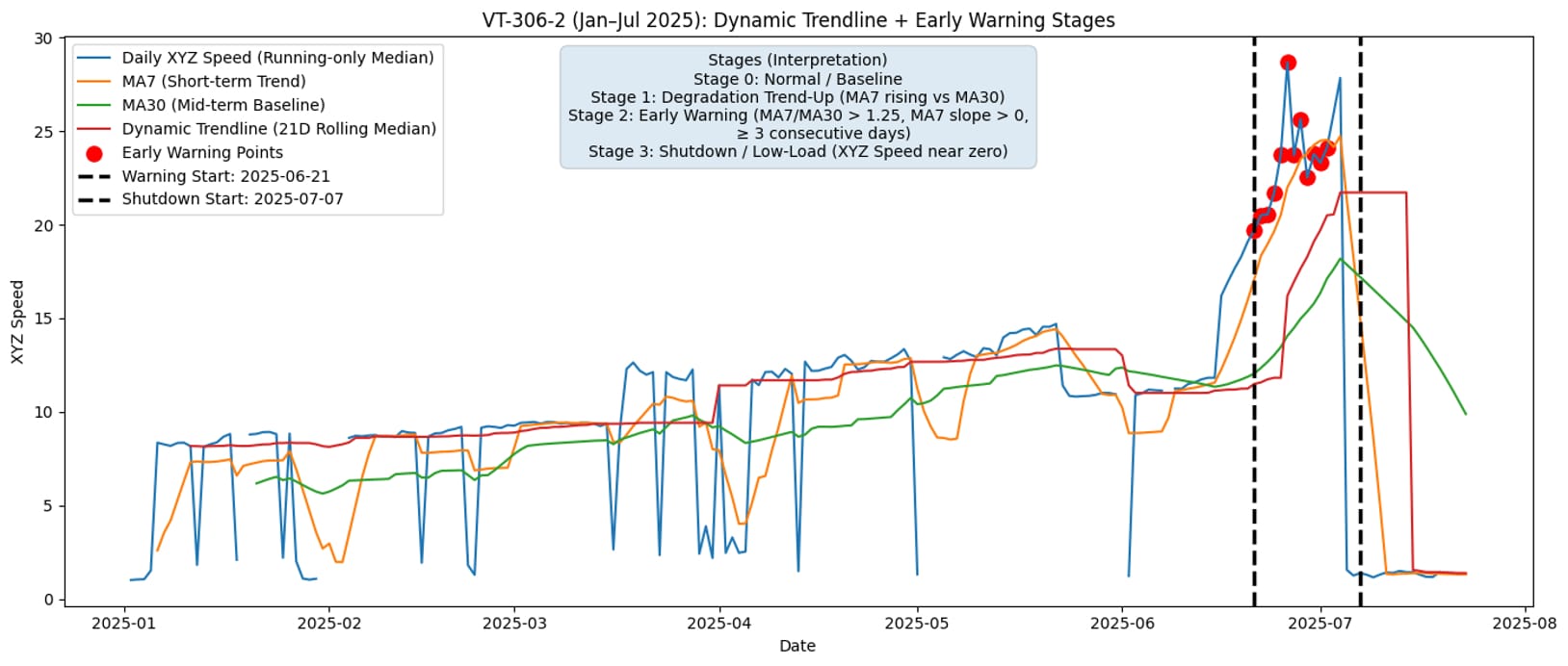
The example below shows how a maintenance review can compare a running-only signal with short-term and mid-term baselines. The marked warning window gives the reviewer a concrete period to check against operating state, alarms, inspections, and later shutdown evidence.
Ingest Options
Use the lightest data path that still gives operations enough confidence.
| Path | Use it when |
|---|---|
| Direct readings API | A source system can send equipment readings with consistent timestamps and units. |
| CSV import | Historical data needs to be loaded for a pilot, data review, or initial baseline. |
| DFS Lite connector | Source data needs repeatable connector setup, mapping, sync history, and quality review. |
| DFS Pro dataset | Multiple sources need to be fused into a governed dataset for model or Agent workflows. |
CSV files may use long or pivoted formats when supported by the deployment. Confirm the final accepted format from the customer deployment guide or runtime API.
Minimum Quality Checks
Before the first review meeting, confirm:
- timestamps are ordered and use the expected timezone;
- units are explicit and consistent;
- equipment IDs match the selected asset scope;
- stale or missing values are visible;
- readings are not duplicated across source systems;
- operating-state filters are available where needed;
- work-order history uses the same equipment reference.
Work-Order and Inspection Context
Signals alone rarely explain a maintenance decision. Include:
| Context | Why it matters |
|---|---|
| Open and closed work orders | Helps distinguish recurring issues from isolated readings. |
| Root cause and action notes | Provides labels for later advisory outcome review. |
| Inspection findings | Adds human-observed evidence such as noise, vibration, leakage, temperature, or access constraints. |
| Attachments and reports | Support maintenance review and audit evidence. |
| Failure mode labels | Improve failure-mode distribution and future diagnosis review. |
Handoff to Health and Anomaly Review
After the first data package is prepared:
- Create or update the equipment profile.
- Load a small sample of recent signal data.
- Confirm the equipment appears in the Predictive Maintenance dashboard.
- Review latest health and health history.
- Check anomalies by equipment.
- Add work-order or inspection context before accepting an advisory.
Expected Output
The prepared data package should include:
- a stable equipment profile for each monitored asset;
- mapped signal names, units, and timestamps;
- recent readings for the first review window;
- work-order and inspection context where available;
- visible data quality exceptions;
- a handoff note for health, anomaly, and advisory review.
Validation Checklist
- Equipment IDs match across source data, Predictive Maintenance, DFS, and work orders.
- Signal units are explicit and consistent.
- Source timestamps are ordered and use the expected timezone.
- Missing or stale values are visible before review.
- Work-order history links to the same equipment boundary.
- A small sample can be traced from source record to equipment health view.
Troubleshooting
| Symptom | Check |
|---|---|
| Signals attach to the wrong asset | Equipment ID mapping, alias table, and source path. |
| Health remains empty after import | Reading timestamps, unit parsing, required channels, and tenant scope. |
| Repeated duplicate events | Source job overlap, CSV duplicate rows, and connector sync window. |
| Work-order history fails to join | Asset reference, main equipment bridge, and CMMS mapping. |