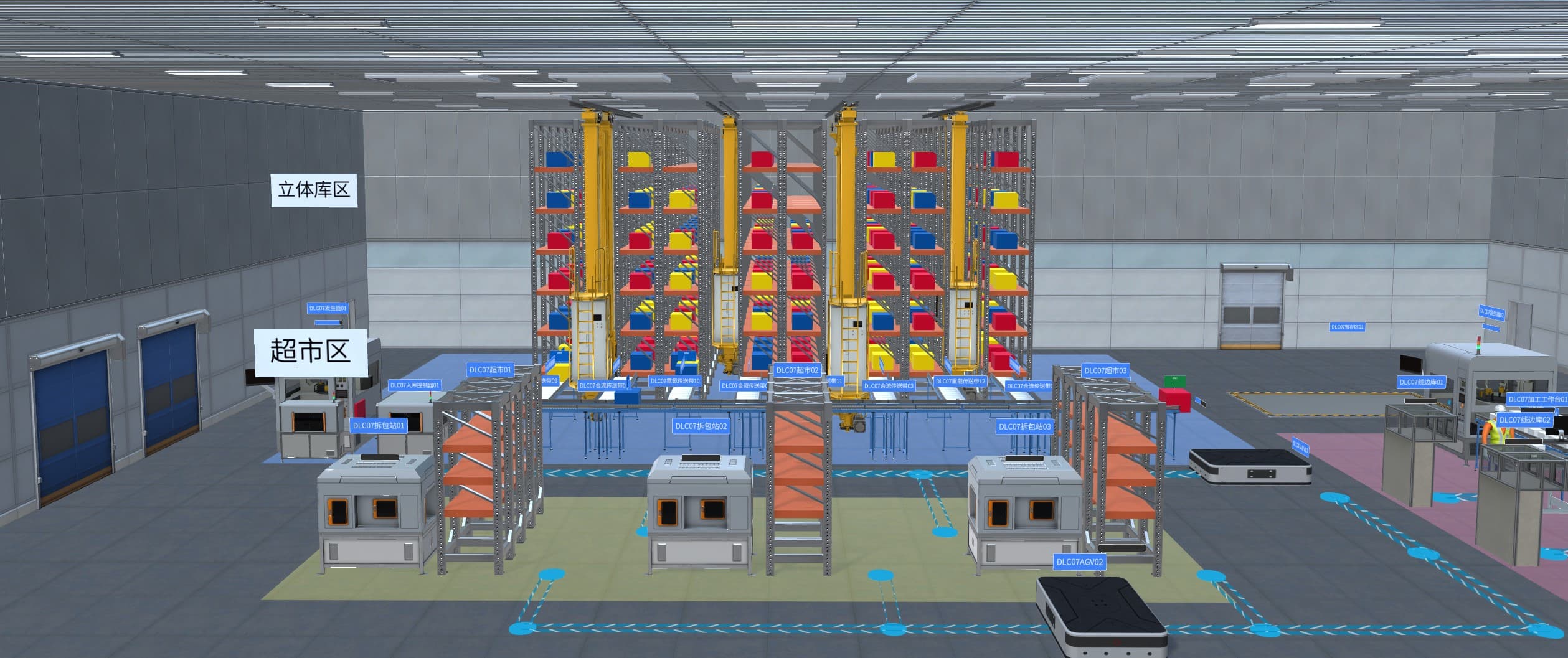
Intralogistics depends on physical context
Warehouse and factory logistics work happens in physical space. A storage policy may look correct in a table, yet the result depends on aisle width, forklift turning radius, dock queues, charging locations, pedestrian crossings, staging capacity, conveyor handoff timing, and how operators recover from exceptions.
Automation planning adds more pressure. Teams need to discuss AGV or AMR routes, conveyor changes, storage density, line-side delivery, replenishment windows, and safety zones before they commit capital, move equipment, or interrupt operations. Static drawings, spreadsheets, and process maps help, but they rarely give every stakeholder the same operating picture.
An operational digital twin gives the team a shared spatial layer. It connects warehouse zones, material routes, equipment, work areas, procedures, operating records, and scenario assumptions so planners, automation vendors, safety teams, trainers, and operations leaders can review the same environment.
What to model
Useful intralogistics twins start with practical operating objects:
| Layer | Examples |
|---|---|
| Spaces | docks, receiving areas, storage zones, line-side areas, staging, shipping, quarantine, charging areas |
| Routes | forklift paths, AGV or AMR paths, conveyor lines, pedestrian crossings, emergency access, maintenance access |
| Assets | racks, conveyors, doors, gates, vehicles, charging equipment, sensors, scanners, safety devices |
| Work rules | picking, replenishment, loading, unloading, sequencing, inspection, exception handling, shift handover |
| Events | blocked route, delayed pickup, full buffer, damaged pallet, equipment fault, safety stop, missed scan |
| Records | inspection findings, work orders, photos, operator notes, training results, scenario versions |
The point is traceability. A route, rack, dock, vehicle, work order, and scenario should refer to the same asset and location identity across planning, training, inspection, and operational review.
Planning before automation investment
Before automation investment, teams need to test basic questions:
- Are docks, staging areas, storage zones, and line-side buffers placed correctly?
- Do forklift paths, pedestrian paths, and AGV or AMR paths conflict?
- Does a proposed conveyor, lift, gate, or charging area block maintenance access?
- Where do queues appear when receiving, picking, shipping, or line feeding peaks?
- Can operators see, reach, and recover from the likely exception points?
- Which scenario should move into vendor engineering, detailed simulation, or a physical pilot?
FactVerse DLC gives delivery teams reusable warehouse and logistics content such as warehouse zones, transport routes, storage areas, and transport-line assets. FactVerse Designer then lets teams adapt those resources to the actual site, compare layout variants, and create reviewable scenes.
The value is clarity before disruption. A digital twin review can remove weak options, sharpen requirements for automation vendors, and give operations teams a clearer view of how a proposed layout will affect daily work.
Scenario validation
Warehouse and intralogistics validation should focus on decisions that teams can act on:
- route conflicts and clearance issues
- dock, staging, and buffer capacity
- forklift, AGV, AMR, conveyor, and operator handoff points
- emergency access and safety boundary review
- replenishment timing and line-side delivery assumptions
- equipment placement, charging location, and maintenance access
- exception workflows such as damaged goods, blocked aisles, failed scans, or equipment faults
At this stage, the digital twin works as a decision layer. It narrows layout and route options, identifies questions that need deeper simulation, and organizes the evidence needed for vendor engineering, site trials, and operating procedure design.
Training and safety rehearsal
Intralogistics projects change how people move through a site. Operators may need new routes, new loading sequences, new scanner steps, new safety checks, or new exception handling. Training should use the same spatial context as planning.
Simulator is relevant when training depends on vehicle behavior, route discipline, physical controls, safety rules, and assessment records. Forklift-style training can help operators practice movement, turning, load handling, visibility, and exception response in repeatable scenarios before they work around live equipment.
Director and Inspector can support guided procedures, inspections, issue capture, and field evidence. This connects training with execution: the route, asset, checklist, photo, issue, and work record remain tied to the same operational twin context.
From planning to work execution
Warehouse digital twins become more useful when they move from a review scene into daily operations:
- Map the site - Align docks, zones, aisles, racks, conveyors, equipment, work areas, and route names with the customer's asset records.
- Create scenarios - Use Designer and warehouse DLC resources to build layout options, transport routes, staging areas, safety boundaries, and operating views.
- Review with stakeholders - Bring operations, engineering, safety, IT, automation vendors, and training teams into the same scene.
- Prepare training - Turn approved routes, procedures, and exception cases into operator training and guided work content.
- Connect records - Use Data Fusion Services and FactVerse to bind equipment state, work records, inspection data, documents, and operating events.
- Execute and capture evidence - Use Inspector to record inspections, issues, photos, repair notes, acceptance steps, and work-order status.
- Prepare AI review - When data and workflows are stable, FactVerse AI Agent can support triage, recommendations, and work execution review.
This sequence keeps planning, training, and execution connected. The model grows from a visual asset into a shared operational context that teams can review and maintain.
Data and AI readiness
AI-assisted logistics operations require stable context. Before asking an AI Agent to reason about routes, bottlenecks, work orders, or equipment states, the site needs consistent identities and records:
- location hierarchy for site, building, floor, zone, aisle, dock, rack, and line-side area
- asset identities for conveyors, vehicles, scanners, gates, chargers, sensors, and safety devices
- route definitions and allowed operating areas
- event definitions for delays, faults, blocked paths, full buffers, safety stops, and missed scans
- work-order and inspection records tied to assets and locations
- training records tied to roles, procedures, routes, and equipment
- data quality status, owners, update cadence, and exception handling rules
With this foundation, AI Agent can support practical work: summarize repeated issues, flag missing context, recommend next checks, connect alarms to work orders, and help teams review operational patterns. Dispatch logic and final operating decisions should stay governed by customer systems, procedures, and accountable teams.
Product roles
FactVerse DLC provides reusable warehouse and logistics content for zones, routes, storage areas, transport lines, planning scenes, and training scenarios.
FactVerse Designer is the authoring environment for layout variants, material routes, scenario views, labels, panels, and stakeholder review.
DataMesh FactVerse and FactVerse Twin Engine hold the operational twin context: spaces, assets, relationships, routes, work objects, permissions, and scenario records.
Data Fusion Services connects operational data, enterprise records, equipment states, documents, and event streams to the right twin objects.
Simulator supports equipment operator training when route discipline, vehicle behavior, physical controls, and assessment records matter.
Inspector connects the twin to inspections, issues, photos, repair notes, work orders, acceptance records, and field evidence.
FactVerse AI Agent can support operational review and work execution preparation after the data model, events, and workflow records are mature.
Readiness checklist
- Are warehouse zones, docks, racks, aisles, staging areas, and line-side areas named consistently?
- Are routes, pedestrian crossings, safety zones, and maintenance access areas defined?
- Are forklifts, conveyors, AGVs, AMRs, chargers, scanners, doors, and gates represented as assets?
- Are layout variants tied to the business question being reviewed?
- Are exception cases documented before training and site rollout?
- Are inspection points, issue categories, work-order handoff, and evidence fields defined?
- Are operator training scenarios linked to real routes, procedures, and equipment?
- Are data owners, refresh cadence, and data quality status clear?
- Are AI Agent use cases grounded in stable asset, route, event, and work-order records?
Public references
The warehousing and logistics DLC update shows how FactVerse content can support logistics environments, routes, layouts, and operational scenarios.
The Gyro intralogistics reference shows digital twins used to make intralogistics automation easier to understand, validate, and implement.
The Jebsee production-line automation planning reference shows how FactVerse can help teams communicate and review automation plans around production-line change.
The DataMesh Simulator Platform announcement shows the public direction for digital twin based operator training and equipment simulation.