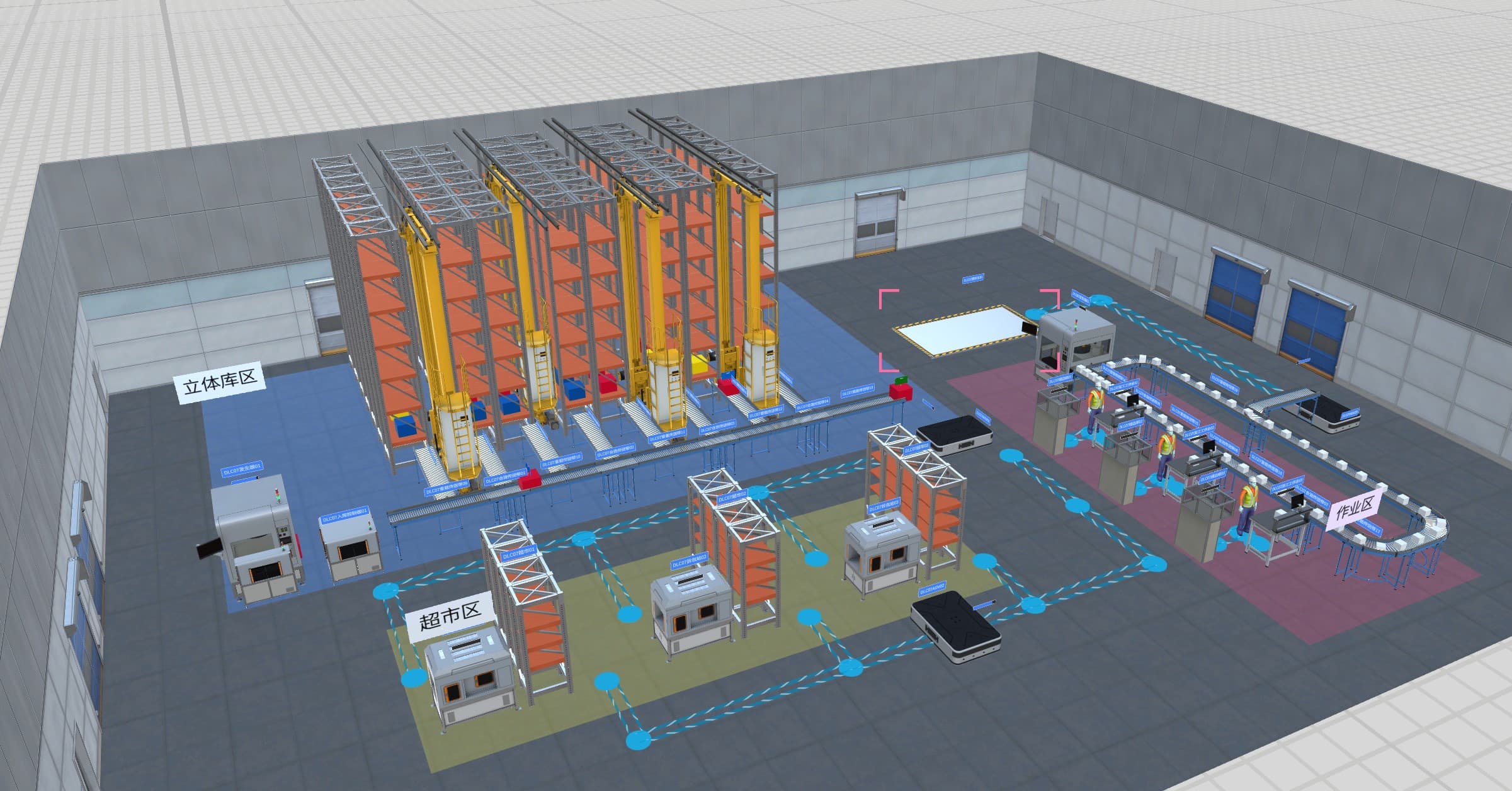
Reusable content makes rollout repeatable
Industrial digital twin projects often spend too much time rebuilding the same foundation: spaces, assets, routes, equipment categories, labels, panels, procedures, and scene behaviors. Delivery teams still need to fit each customer site, yet many starting points are common across sites in the same operating domain.
Digital twin content packs create that reusable baseline. FactVerse DLC gives teams preconfigured content for FactVerse Designer so they can start from a practical industry foundation, then adapt the model, scene, data mapping, and workflow for the customer's facility.
The value is operational consistency. A reusable pack helps product teams, delivery teams, and customer teams speak through the same asset classes, scene structures, work records, and operating views from the first workshop to multi-site rollout.
What a content pack should contain
| Layer | Useful content |
|---|---|
| Asset classes | Equipment types, tags, properties, naming guidance, and role definitions |
| Spatial structure | Site, building, floor, room, zone, line, route, area, and safety boundary |
| Model resources | 3D objects, simplified equipment forms, layout elements, labels, and visual states |
| Scene templates | Common views for operations, maintenance, training, planning, and executive review |
| Behavior logic | State changes, guided steps, alarms, operating sequences, and scenario triggers |
| Data bindings | Source fields, units, timestamps, owners, refresh rules, and mapping to twin objects |
| Workflow context | Inspection points, checklist fields, work-order handoff, evidence capture, and approvals |
| Governance | Version, owner, content scope, update rule, localization, and reuse criteria |
The pack should help teams start faster while keeping each site configurable.
Foundation areas for industrial use
Data center DLC helps teams prepare rooms, racks, facility equipment, energy context, monitoring views, inspection routes, and maintenance records for data center digital twins.
Campus DLC supports building, park, utility, environmental, access, and facility context for multi-building operations and smart facility management.
Warehousing and logistics DLC helps describe warehouse zones, storage areas, routes, transport lines, operating procedures, logistics planning, and training scenarios.
Discrete manufacturing DLC gives teams virtual factory starters for production equipment, conveyors, AGVs, operators, line context, and planning scenes that can be customized in Designer.
These foundations are most useful when the team connects content to the customer's real assets, systems, procedures, and operating records.
DataMesh rollout workflow
- Select the content foundation - Choose the DLC baseline that matches the site type and project objective.
- Map the customer site - Align buildings, rooms, zones, lines, equipment, routes, and work areas with the customer's actual naming and asset records.
- Prepare scenes in Designer - Use FactVerse Designer to adapt models, scene templates, views, labels, panels, and behavior logic.
- Connect the data model - Use FactVerse to organize spaces, assets, relationships, documents, work context, and reusable objects.
- Bind operating data - Use Data Fusion Services to connect source systems, sensor data, enterprise records, maintenance tools, and document references.
- Attach execution workflows - Use Inspector, Director, or other applications to connect inspections, SOP guidance, work orders, training, and field evidence.
- Review and productize reuse - Convert repeated project assets, logic, and workflows back into managed content so later sites start from a stronger baseline.
The loop matters: each delivery should improve the reusable foundation.
How product teams should manage DLC
Treat each content pack as a product asset. It needs an owner, version, scope, example scene, localization plan, release notes, and clear criteria for what belongs inside the reusable layer.
Keep the reusable layer focused on common structure: asset classes, scene foundations, default views, starter logic, and integration patterns. Keep customer-specific names, security rules, live data credentials, approvals, and operating procedures in the project configuration.
This separation helps DataMesh teams maintain quality while keeping projects flexible. It also gives sales, delivery, and customer success teams a more concrete way to explain what will be reused and what will be customized.
How DataMesh products fit
FactVerse DLC provides reusable digital twin content packs for common industrial rollout areas.
FactVerse Designer is where teams open, adapt, and assemble DLC resources into scenes, operating views, and scenario content.
DataMesh FactVerse stores the shared digital twin context, including spaces, assets, relationships, documents, data bindings, and application workflows.
Data Fusion Services connects operational data sources and enterprise records to the right objects in the twin.
Inspector turns the twin context into inspections, work orders, photos, repair records, acceptance notes, and field evidence.
FactVerse AI Agent can use stable twin context and work records for operational review once the data model and workflow are mature.
Rollout checklist
- Does the pack define asset classes and properties clearly enough for delivery teams to reuse?
- Are spatial structures aligned with the way customers operate the site?
- Are model resources light enough for interactive scenes and clear enough for operations?
- Are scene templates tied to real workflows such as inspection, planning, training, monitoring, or maintenance?
- Are data bindings documented with source, unit, owner, refresh rule, and quality status?
- Are Inspector fields, work-order handoff, and evidence records defined before field rollout?
- Are versioning, localization, and content ownership clear?
- Can improvements from one project become reusable content for later projects?
A useful content pack should reduce repeated setup work and increase consistency across projects.
Public references
The IDC DLC announcement shows how reusable content can help teams start data center digital twin scenes in FactVerse Designer.
The warehousing and logistics DLC update shows the same content-pack approach applied to logistics environments, routes, layouts, and operational scenarios.
The Jebsee FactVerse reference shows how production-line planning can benefit from shared digital twin context during automation planning and stakeholder communication.
The NIO smart factory reference shows how manufacturing teams use digital twins as a foundation for factory visibility and operations improvement.